Rental vehicle inspection workflow
Your rental system owns reservations and commercial terms. TrakarIA receives the context needed to inspect a vehicle and holds the authoritative inspection dossier, evidence and validated report revisions.
Try the complete journey: open the TrakarIA Integration Lab to work through a production-like rental desk, inspect every server-side request and start in simulation without an API key. The Lab interface is in English.
Start with the product overview if you are new to TrakarIA. If you are choosing how to connect software, see integration models. The step-by-step scenarios show the normal path and recovery cases.
Who does what
Section titled “Who does what”| Actor | Responsibility | Example |
|---|---|---|
| Your rental software | Reservation reference, planned dates and commercial decisions | Creates booking RES-1042; decides whether to charge for damage |
| TrakarIA | Inspection workflow, evidence, human validation and report history | Records departure condition and compares it with return |
| Your staff | Actions performed under their own TrakarIA identity | Signs in, takes photos, reviews findings and validates an inspection |
A group API key identifies your software. It does not identify the person doing the inspection or grant them access. The person signs in to TrakarIA and needs the appropriate group permissions. The Rental journey can also be completed directly in the application without a partner API connection.
The human journey
Section titled “The human journey”- A vehicle exists in a TrakarIA group, created in the application or synchronized by your software.
- A Rental dossier holds the operational context of one reservation. TrakarIA does not replace the booking, payment or availability system.
- An authorized person records the vehicle condition at departure and validates the departure inspection.
- At return, a person records the current condition and validates the comparison with departure. There is no separate official return report kind.
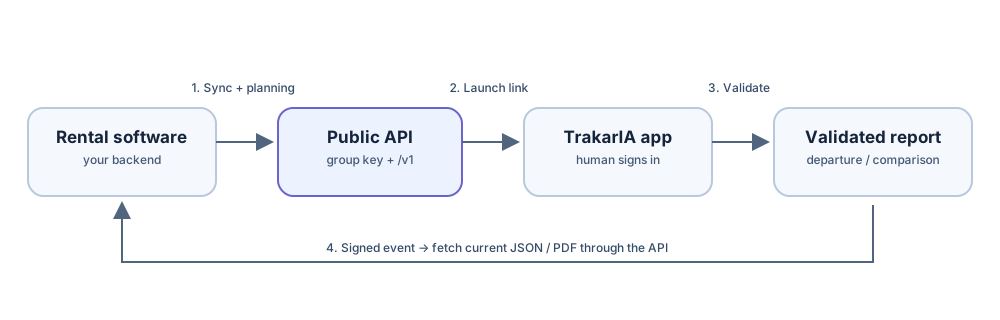
- If your software uses the public API, TrakarIA can send signed webhooks when departure or return is validated. Your backend then fetches the departure or comparison report.
Reports, photos and correction history remain subject to the account’s retention and access rules. The integration models explain when to use the application alone or a launch link.
Receive results by webhook
Section titled “Receive results by webhook”To be notified when an inspection is validated, add an HTTP or HTTPS webhook destination to your API key under Organization → Integrations → API keys → Manage webhooks. Subscribe to rental.departure.completed and rental.return.completed; add rental.report.pdf_ready if you also want a PDF readiness notification. TrakarIA sends a signed POST to your backend. Verify the signature with that destination’s secret, then use the event identifiers to fetch the report through the authenticated API: a webhook is a notification, not the full report. See webhooks and recovery for verification and missed events.
Main flow
Section titled “Main flow”- Vehicle:
PUT /v1/vehicles/by-external/{external_id}creates or updates the vehicle linked to your stable identifier. - Rental dossier and planning:
PUT /v1/rentals/by-external/{external_id}links your reservation to that vehicle and immediately adds it to planning. Onlyvehicle_external_idis required in the body; the remaining business fields are optional. Save the returned Rentalidandplanning.entry_id. Use a newer source revision orPATCH /v1/rentals/{rental_id}for supported context changes. - Departure:
POST /v1/rentals/{rental_id}/inspectionswith{"type":"departure"}creates or resumes the inspection. Send a uniqueIdempotency-Keyheader. Open the returnedlaunch_urlin the TrakarIA interface. The person performing the inspection must sign in. - Departure result: after validation, the
rental.departure.completedwebhook signals that the departure report is available. Retrieve its JSON and its PDF when ready. - Return: call the same inspection endpoint with
{"type":"return"}. After validation, therental.return.completedwebhook announces the comparison report against departure. Read its JSON and download its PDF when ready; its report kind iscomparison, notreturn.
If an event is missed, poll GET /v1/events and read the current Rental state or report index. Webhooks and recovery explain this pattern.
Other supported paths
Section titled “Other supported paths”GET /v1/inspections/{inspection_id}reads inspection status.POST /v1/inspections/{inspection_id}/launchrenews an expired launch link.- Rental attachments are private documents, separate from official inspection photos. Upload or list them through
/v1/rentals/{rental_id}/attachments; the content route streams authorized bytes. GET /v1/inspections/{inspection_id}/evidenceexposes operational photo metadata, including whether a photo was captured for the current record or reused from a baseline.- Driver license extraction proposes reviewable fields; it does not silently update a confirmed driver.
The API reference defines exact fields, limits and response codes. Synchronization and errors covers updates that arrive out of order.