Choose an integration model
The inspection itself is always completed by an authorized person in the TrakarIA application. The first decision is who creates the dossier and prepares the inspection. An API connection and a launch button are separate choices.
| Model | What your system does | What the operator does | Good fit |
|---|---|---|---|
| Application only | No public API calls: no booking is synchronized | Selects or creates the vehicle, starts departure and return, enters needed details in TrakarIA | Team without a rental-system integration |
| API, no button | Synchronizes vehicle and dossier; the booking appears in planning immediately, then the system prepares departure and return through the API | Sees the reservation in planning, finds the prepared inspection and validates it | Connected software; team already working in TrakarIA |
| API + button | Same planning synchronization and preparation, then displays the returned launch_url | Opens the link, signs in and validates in TrakarIA | Rental software with an “Open inspection” button |
Webhooks and API report reads are available in both connected modes. You must configure a webhook destination to receive notifications; synchronization alone does not create one. In “application only” mode, your rental software receives nothing automatically. Cycles created only in the application do not automatically become /v1/rentals dossiers if you add the API later.
The linked journey
Section titled “The linked journey”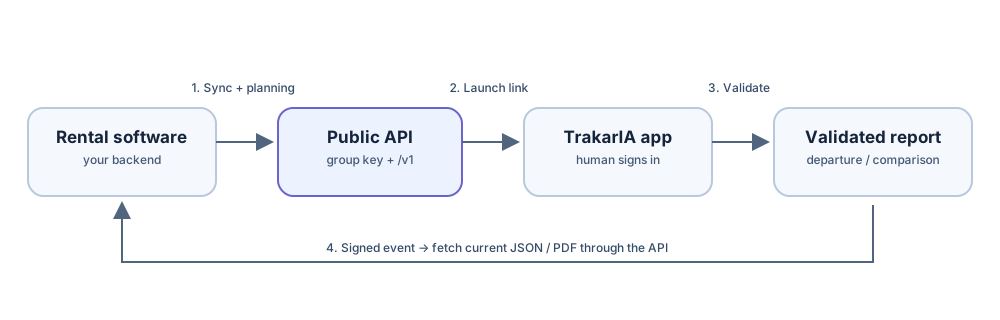
- Your backend sends the vehicle and Rental context using its group API key. The Rental appears in planning immediately. Only the vehicle external ID is required in the body; the remaining context can be sent in advance, at handover or later with a newer source revision. Do this on the server, never from a customer browser.
- Your backend calls
POST /v1/rentals/{rental_id}/inspectionswithtype: departureorreturnand anIdempotency-Key. - The response contains an inspection ID and a short-lived
launch_url. Your application can show a button that opens that link. A new tab or normal navigation is the supported pattern. - The link redirects to the relevant first-party TrakarIA workflow. If the operator has no active session, they sign in. TrakarIA checks the person’s group access and permissions before the work proceeds.
- After human validation, your backend receives a signed completion event or retrieves missed events from
GET /v1/events, then fetches the report through the authenticated API.
The launch link expires and can be renewed with POST /v1/inspections/{inspection_id}/launch. It is a navigation aid, not an access token. Keep it out of logs, analytics and public pages. Embedding the inspection in an iframe or running a headless capture SDK is not part of the current public contract. Plan normal browser navigation for now.
Your application can also stop at a hand-off
Section titled “Your application can also stop at a hand-off”If your staff already work in TrakarIA, you do not need a launch button. Your backend still needs its API key: it synchronizes vehicle and dossier, which immediately makes the reservation visible in planning, then calls POST /v1/rentals/{rental_id}/inspections before the operator resumes the prepared inspection in the TrakarIA application. Synchronization may happen ahead of time or during physical handover. The button merely opens that inspection directly. See the detailed scenarios for the distinction from an entirely manual workflow.
When to add callbacks
Section titled “When to add callbacks”Use webhooks when your system should react promptly to validation. Treat them as notifications: verify the signature, deduplicate by event ID, and fetch the current resource. Use GET /v1/events for recovery after downtime. The rental.departure.completed event means departure JSON is ready; rental.return.completed means the comparison JSON is ready. PDF readiness has its own event and may arrive later.